
Greetings,
The team has been busy working on a suite of updates that add essential trading features to the PoolinWallet. Following the zero-fee trading feature, we are now adding a new trading order type “STOP-MARKET” in hopes to complement our product offerings.
Find out what’s available now in this article!
Explore Stop-Market Orders
The stop-market order uses a stop price as a trigger. When the stop price is reached, it triggers a market order.
The stop-market order is initially inactive when being placed, and it is practical where the uncertainty prevails in the crypto market (i.e., markets in extremely volatile periods and the price movement can be in either direction within hours). A buy stop-market order is normally placed at a stop price below the market price (or so-called spot price: best price currently available) while a sell stop-market order is normally placed at a stop price above the market price. You can utilize sell stop-market orders to exit a trade either for taking profit (protect unrealized profits if exists) or to stop loss (minimize potential losses if applies). Meanwhile, you could also place buy stop-market orders in an attempt to enter the market at a lower price.
To get the best out of a stop-market order, we recommend setting an “ample” price distance between the stop price and the market price. However, there is no ideal optimal gap between the stop price and the market price. You are advised to revise your trading strategy from time to time due to the constant price fluctuations in the market. You should always carefully consider whether a trade is consistent with your risk tolerance, investment experience, financial condition, and other considerations that may be relevant to you.
Ultimately, a stop-market order comes down to a market order. The market order is executed based on the limit orders already placed on the order book of an exchange. Namely, the successful execution of a market order removes certain liquidity from the exchange, and thus you have to pay fees (*note: PoolinWallet current offers a zero-fee trading promotion on both market orders and stop-market orders, applying to BTC/USDT and ETH/USDT) as a “taker” who take the price set by “makers”. All market orders are not visible in the order book for any market participant and have no specific price limit but are matched to the best available contra-side bid or offer. When trading highly liquid assets with a narrow bid-ask spread, a market order will get you a price close to or at the expected spot price. However, assets with a larger spread have a much higher chance of causing slippage.
Apart from being executed in exchanges, your stop-market orders may be conducted through our trusted Over-The-Counter (OTC) trading services for seamless settlement, optimal quotations, and a near-complete fill-up.
There is no guarantee that your stop-market order will be filled immediately and completely. The trade execution is not instantaneous even if the stop price is hit. In some cases, your stop-market order might only be partially filled, and the unfilled amount/qty will be subject to a refund into your assets account shortly after the trade execution. Also, please bear in mind that if the market price changes too fast, your stop-market order might be filled at a price that deviates dramatically and significantly from the stop price. It all depends on the market conditions and overall liquidity. Rest assured, we will be implementing transparency practices to our best on the pricing, trading fees, and so on and so forth.
Although you have less control over the execution price in stop-market orders than limit orders, the stop-market order tends to be filled much faster and completely.
Placing Your Stop-Market Orders
- You can find the stop-market page following:
PoolinWallet App Homepage > Trade > Select “Stop-Market” at the top.
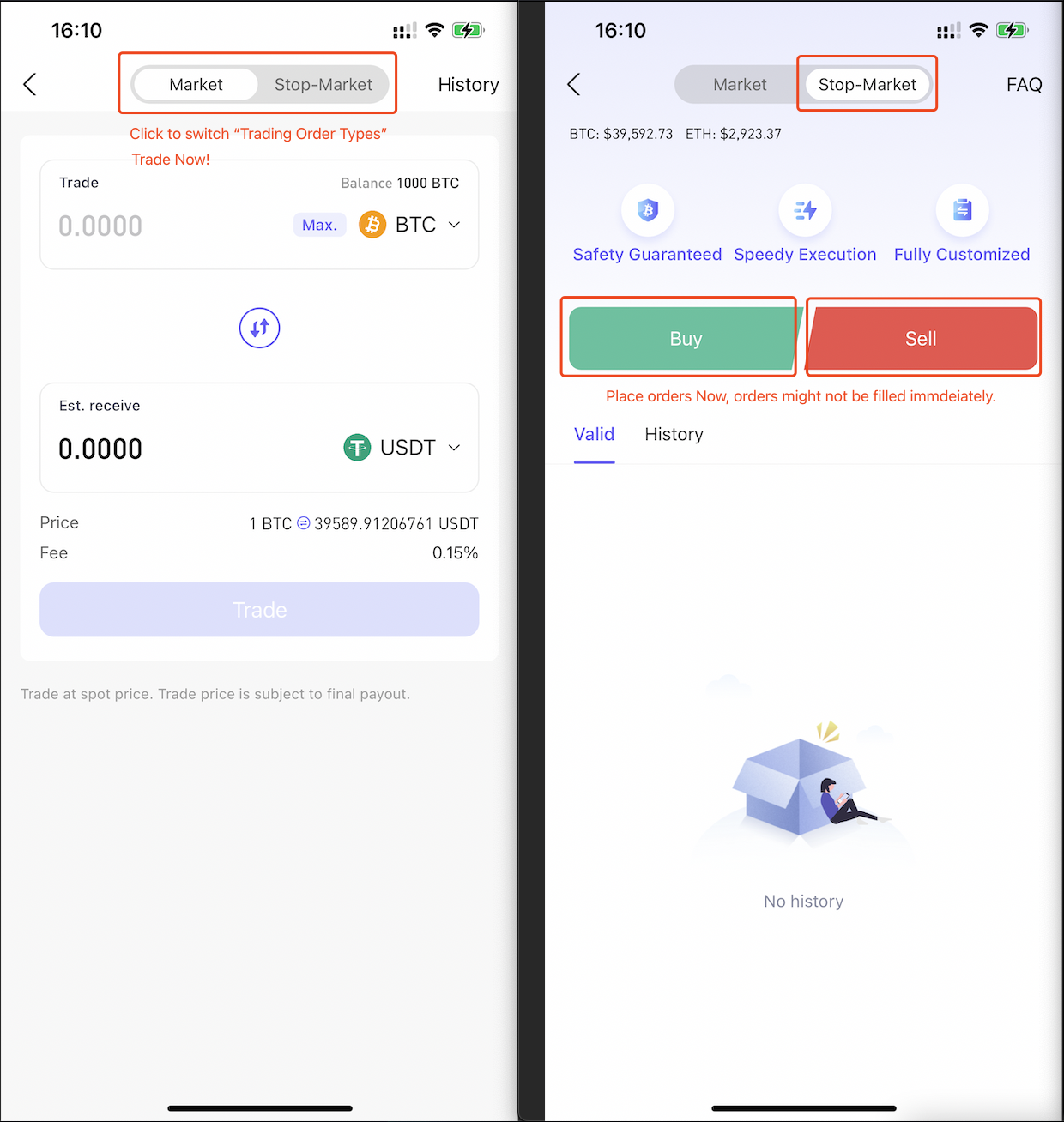
(Screenshot 1: Stop-Market Entry)
- Steps before placing orders:
- Select trading direction (either buy or sell)
- Select trading pair (available: BTC/USDT and ETH/USDT)
- Specify two key parameters:
a. The stop price
b. The amount (for buying) or the qty (for selling).
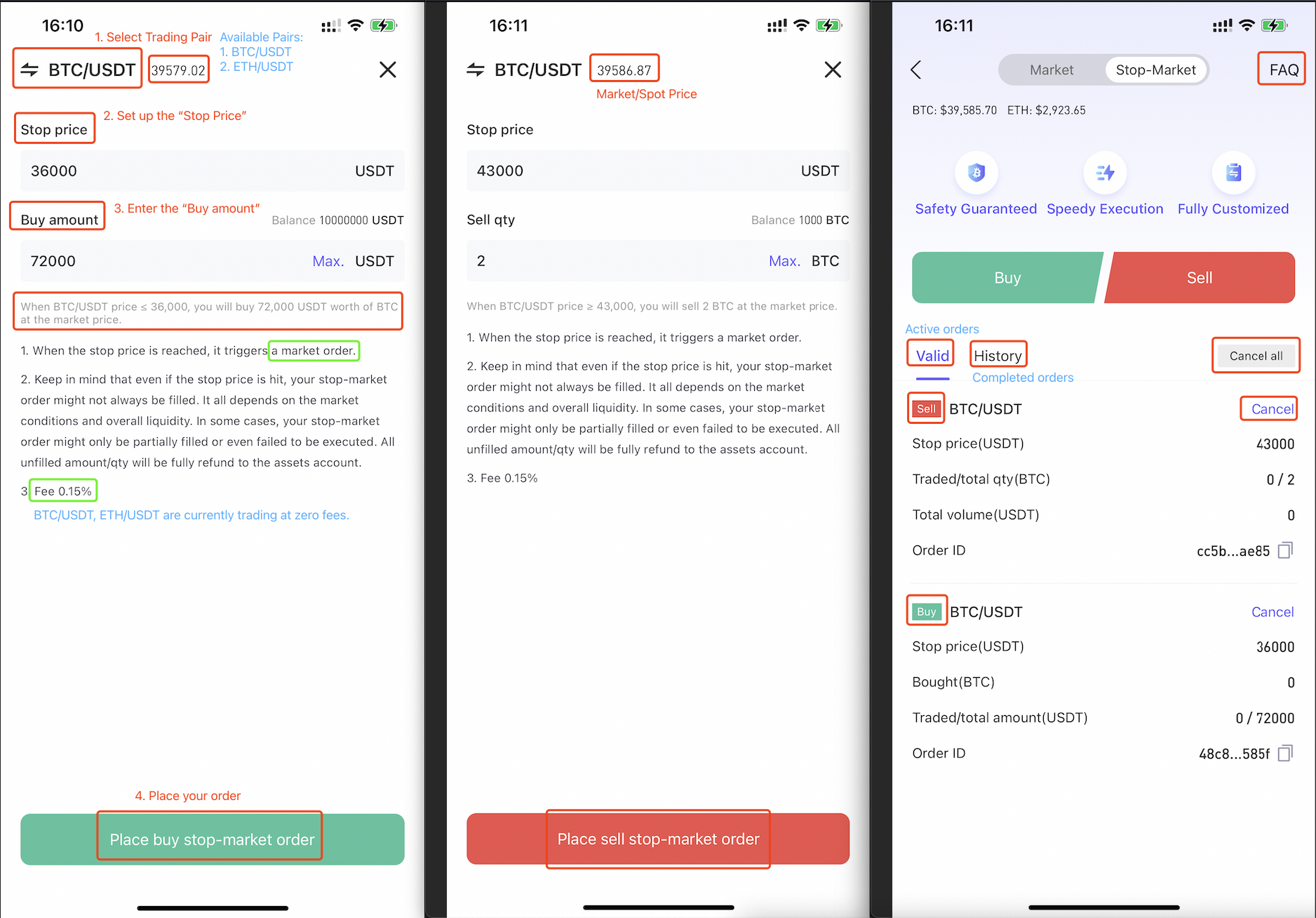
(Screenshot 2: Using BTC/USDT Pair as An Example)
*Always double-check before placing the order!
Please note that the system will automatically reject orders that fail the balance check (automated & derived from your assets account) or exceed the position limit when placing orders.
Besides, all stop-market orders are fixed after being placed and must be manually canceled and reset if needed.
- The same procedure applies for placing ETH/USDT stop-market orders:
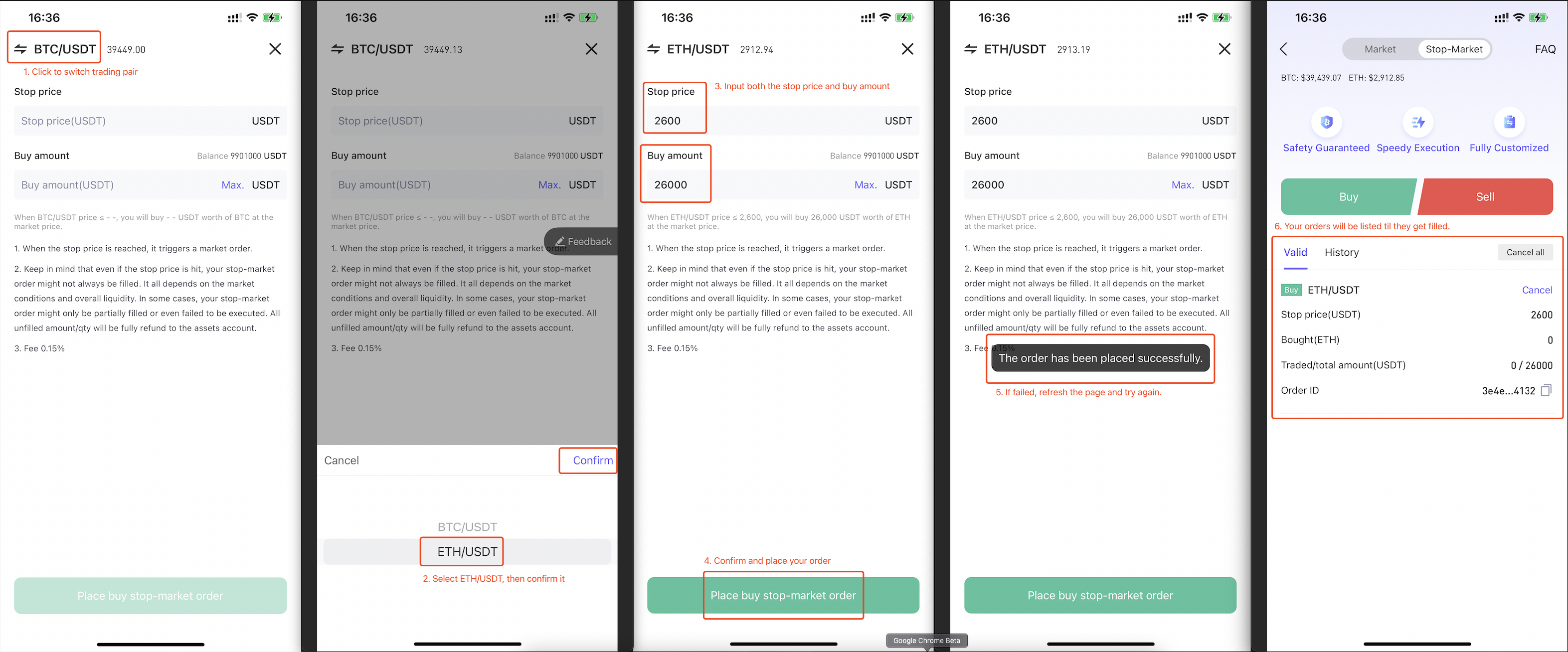
(Screenshot 3: Example For Placing ETH/USDT Buy Stop-Market Orders)
- If you accidentally place either a buy stop-market order that the stop price is above the market price or a sell stop-market order that the stop price is below the market price, the order will be executed directly at the market price after the order placement. You may find your order in the list of “History” as the order is executed.
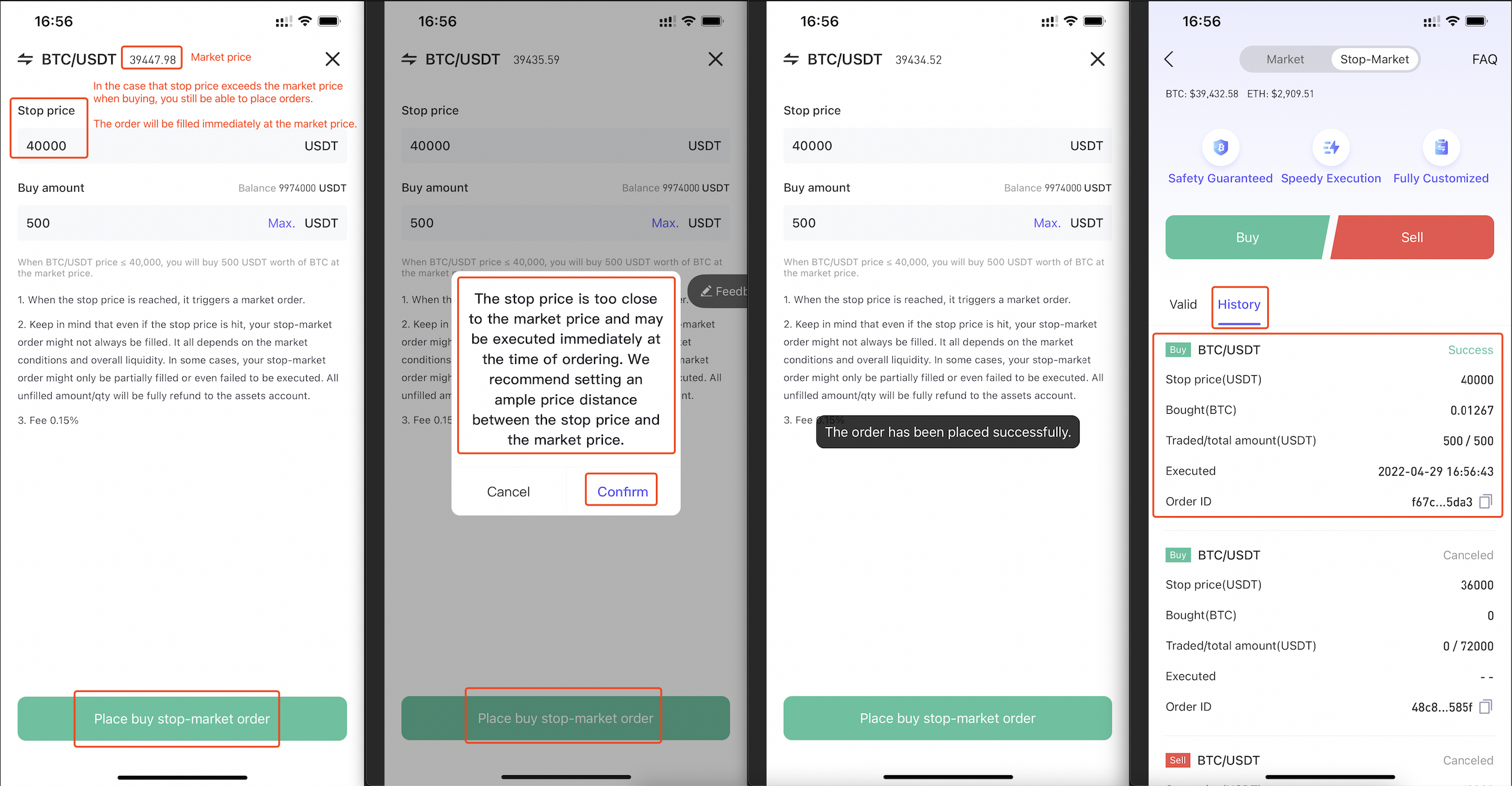
(Screenshot 4: Special Cases of Stop-Market Orders)
That’s all about the PoolinWallet stop-market order. Please feel free to contact support@poolin.io or directly to author jesse.r@poolin.io if you need any further information.
We will continue bringing more effective tools and features so that you can manage your crypto assets in one & great wallet.
PoolinWallet Team
May 4, 2022
PoolinWallet
A trusted custodial wallet operated by #Poolin Singapore since 2019
Trade #Bitcoin and #Ethereum at zero cost.
Deposit & HODL #Bitcoin with an attractive APR.
---------------------------------
Website https://poolin.fi/
App Download https://poolin.fi/download
Help Center https://poolinwallet.zendesk.com/hc/en-us
Email support@poolin.io
Twitter https://twitter.com/PoolinWallet
Telegram https://t.me/poolinwallet
Discord https://discord.gg/grnRXyQmSV
Poolin Community https://t.me/poolincommunity
Medium https://medium.com/@PoolinWalletOfficial
Reddit https://www.reddit.com/r/poolinwallet/
Comments
0 comments
Please sign in to leave a comment.